Developer Guide
Table of Contents
- Acknowledgements
- Setting up, getting started
- Design
- Implementation
- Documentation, logging, testing, configuration, dev-ops
- Appendix: Product Details
- Appendix: Instructions for manual testing
- Appendix: Planned Enhancements
- Appendix: Glossary
Acknowledgements
This project, ABCLI, builds on the Address Book Level 3 (AB3) project, originally developed by the SE-EDU initiative. We extend our heartfelt thanks to the AB3 developers for their foundational work, which has greatly influenced the structure and functionality of ABCLI.
We would also like to express our gratitude to the creators of the following resources, libraries, and tools that were pivotal in the development of ABCLI:
The contributions of these resources and their developers were indispensable in bringing ABCLI to fruition, and we deeply value their impact on our work.
Setting up, getting started
Refer to the guide Setting up and getting started.
Design
 Tip: The
 .puml files used to create diagrams in this document docs/diagrams folder. Refer to the
PlantUML Tutorial at se-edu/guides to learn how to create
and edit diagrams.
Architecture
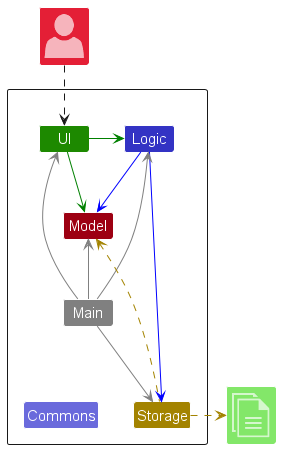
The Architecture Diagram given above explains the high-level design of the App.
Given below is a quick overview of main components and how they interact with each other.
Main components of the architecture
Main (consisting of
classes Main
and MainApp) is in
charge of the app launch and shut down.
- At app launch, it initializes the other components in the correct sequence, and connects them up with each other.
- At shut down, it shuts down the other components and invokes cleanup methods where necessary.
The bulk of the app’s work is done by the following four components:
-
UI: The UI of the App. -
Logic: The command executor. -
Model: Holds the data of the App in memory. -
Storage: Reads data from, and writes data to, the hard disk.
Commons represents a collection of classes used by multiple other components.
How the architecture components interact with each other
The Sequence Diagram below shows how the components interact with each other for the scenario where the user issues
the command delete 1.
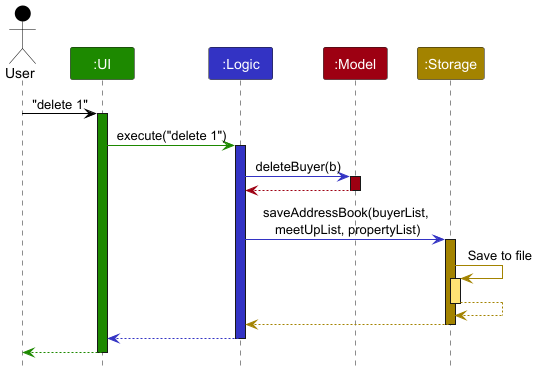
Each of the four main components (also shown in the diagram above),
- defines its API in an
interfacewith the same name as the Component. - implements its functionality using a concrete
{Component Name} Managerclass (which follows the corresponding APIinterfacementioned in the previous point).
For example, the Logic component defines its API in the Logic.java interface and implements its functionality using
the LogicManager.java class which follows the Logic interface. Other components interact with a given component
through its interface rather than the concrete class (reason: to prevent outside component’s being coupled to the
implementation of a component), as illustrated in the (partial) class diagram below.
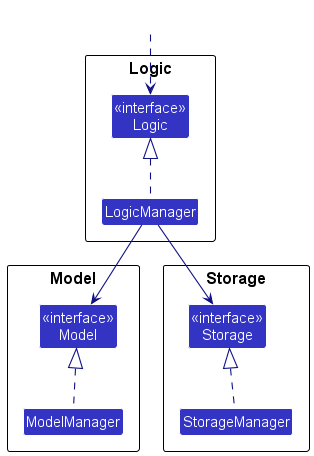
The sections below give more details of each component.
UI component
The API of this component is specified
in Ui.java
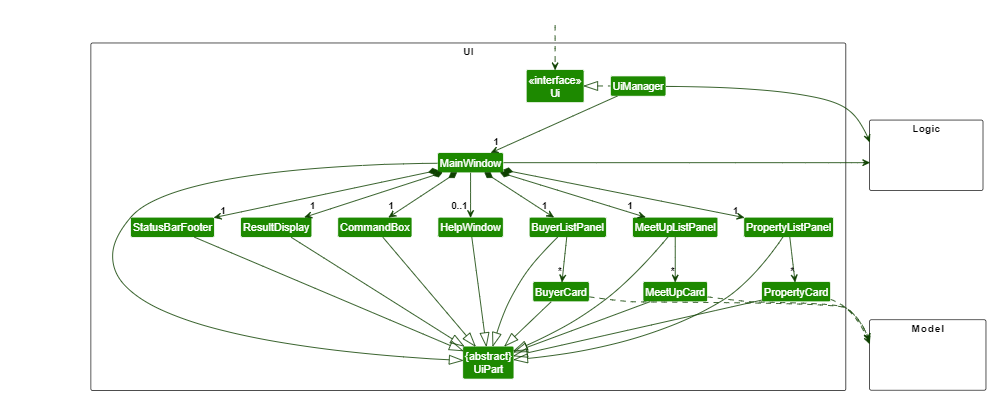
The UI consists of a MainWindow that is made up of parts
e.g.CommandBox, ResultDisplay, BuyerListPanel, StatusBarFooter etc. All these, including the MainWindow,
inherit from the abstract UiPart class which captures the commonalities between classes that represent parts of the
visible GUI.
The UI component uses the JavaFX UI framework. The layout of these UI parts are defined in matching .fxml files that
are in the src/main/resources/view folder. For example, the layout of
the MainWindow
is specified in MainWindow.fxml
The UI component,
- executes user commands using the
Logiccomponent. - listens for changes to
Modeldata so that the UI can be updated with the modified data. - keeps a reference to the
Logiccomponent, because theUIrelies on theLogicto execute commands. - depends on some classes in the
Modelcomponent, as it displaysBuyer,MeetUporPropertyobject residing in theModel.
Logic component
API : Logic.java
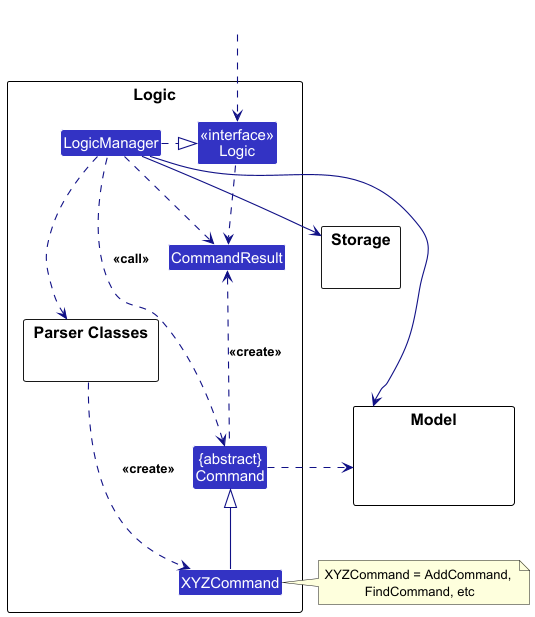
Here’s a (partial) class diagram of the Logic component:
The sequence diagram below illustrates the interactions within the Logic component, taking execute("delete 1") API
call as an example.
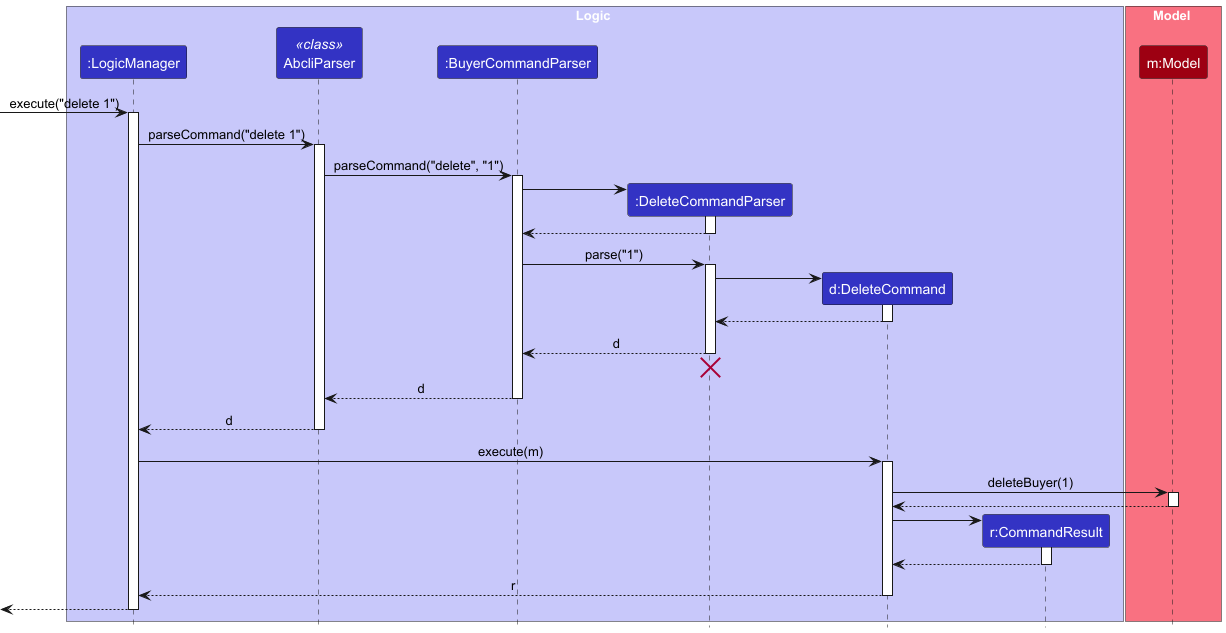
 Note: The lifeline for
 DeleteCommandParser should end at the destroy marker (X) but due to a limitation of PlantUML, the lifeline continues till the end of diagram.
How the Logic component works:
- When
Logicis called upon to execute a command, it is passed to theAbcliParserclass. - The
AbcliParserclass then creates either aBuyerCommandParser,MeetUpCommandParser, orPropertyCommandParseraccording to itscurrentMode. - The created CommandParser then creates another parser that matches the command (e.g.,
DeleteCommandParser) and uses it to parse the command. The type of parser created here is dependent on the CommandParser created in step 2, e.g. aMeetUpCommandParserwill create aDeleteCommandParserfor theMeetUpclass, while aBuyerCommandParserwill create aDeleteCommandParserfor theBuyerclass. - This results in a
Commandobject (more precisely, an object of one of its subclasses e.g.,DeleteCommand) which is executed by theLogicManager. - The command can communicate with the
Modelwhen it is executed (e.g. to delete a buyer).
Note that although this is shown as a single step in the diagram above (for simplicity), in the code it can take several interactions (between the command object and theModel) to achieve. - The result of the command execution is encapsulated as a
CommandResultobject which is returned back fromLogic.
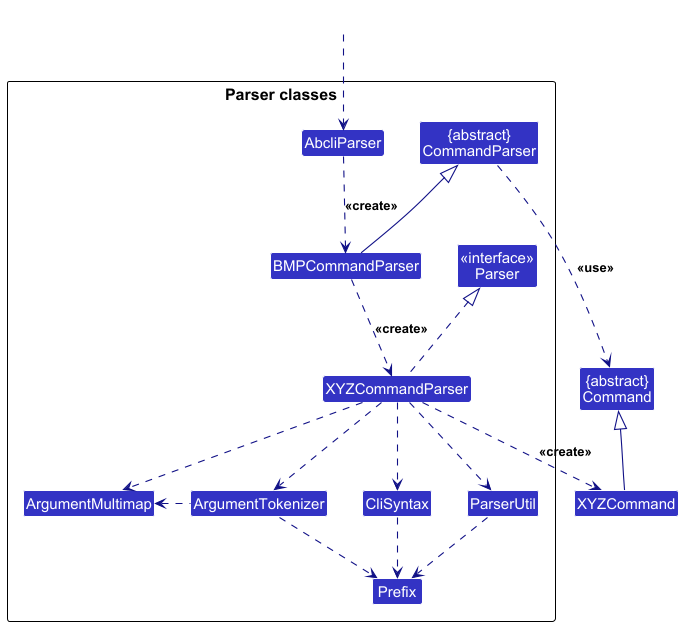
Here are the other classes in Logic (omitted from the class diagram above) that are used for parsing a user command:
How the parsing works:
- When called upon to parse a user command, the
AbcliParserclass creates aBMPCommandParser(BMPis a placeholder for the different mode of parsers, either aBuyerCommandParser,MeetUpCommandParser, orPropertyCommandParser). The createdBMPCommandParserthen creates anXYZCommandParser(XYZis a placeholder for the specific command name e.g.AddCommandParser) which uses the other classes shown above to parse the user command and create anXYZCommandobject (e.g.,AddCommand) which theAbcliParserreturns back as aCommandobject. - All
XYZCommandParserclasses (e.g.,AddCommandParser,DeleteCommandParser, …) inherit from theParserinterface so that they can be treated similarly where possible e.g. during testing. - All
BMPCommandParserclasses (BuyerCommandParser,MeetUpCommandParser, andPropertyCommandParser) extends theCommandParserclass so that all of them have access to general commands e.g.HelpCommand,Exit Command.
Model component
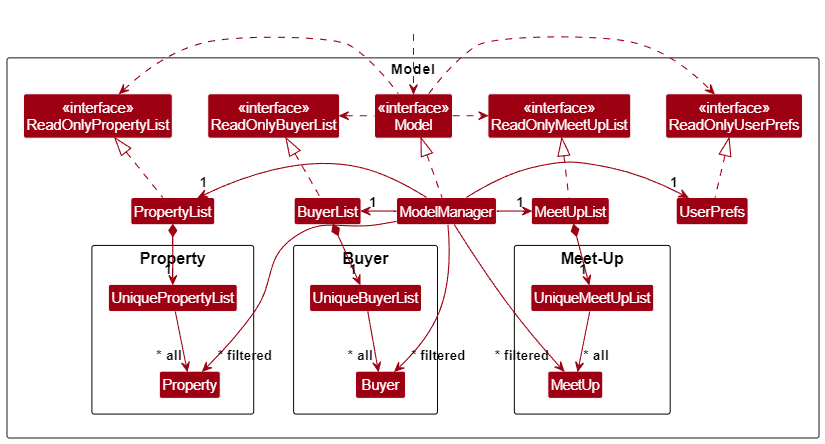
Note: This model class diagram is simplified for readability. The implementation of the Buyer, MeetUp and Property models are given below.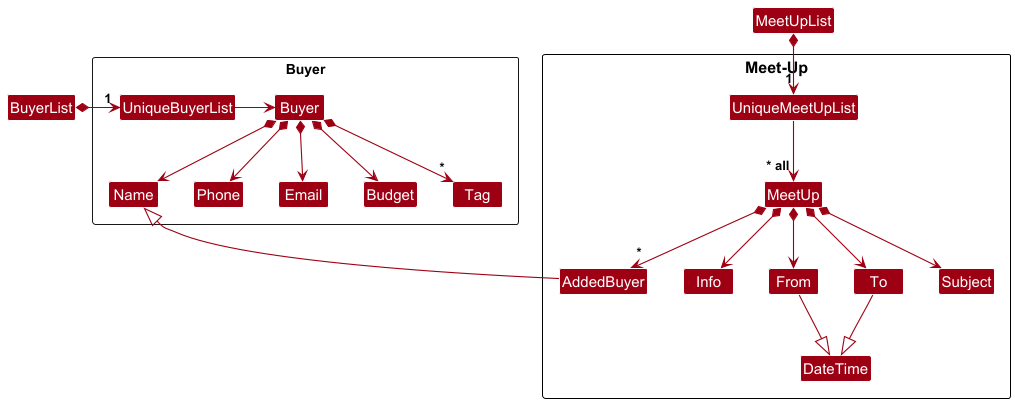
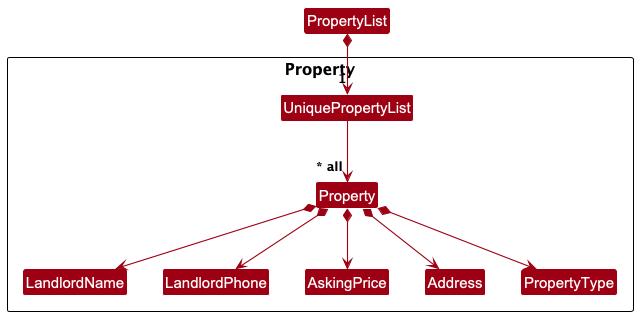
The Model component,
- stores the buyer list data i.e., all
Buyerobjects (which are contained in aUniqueBuyerListobject). - stores the meet-up list data i.e. all
MeetUpobjects (which are contained in aUniqueMeetUpListobject). - stores the property list data i.e. all
Propertyobjects (which are contained in aUniquePropertyListobject). - stores the currently ‘selected’
Buyerobjects (e.g., results of a search query) as a separate filtered list which is exposed to outsiders as an unmodifiableObservableList<Buyer>that can be ‘observed’ e.g. the UI can be bound to this list so that the UI automatically updates when the data in the list change. - stores the currently ‘selected’
MeetUpandPropertyobjects in a similar fashion to the currently ‘selected’Buyerobjects. - stores a
UserPrefobject that represents the user’s preferences. This is exposed to the outside as aReadOnlyUserPrefobjects. - does not depend on any of the other three components (as the
Modelrepresents data entities of the domain, they should make sense on their own without depending on other components)
Storage component
API : Storage.java
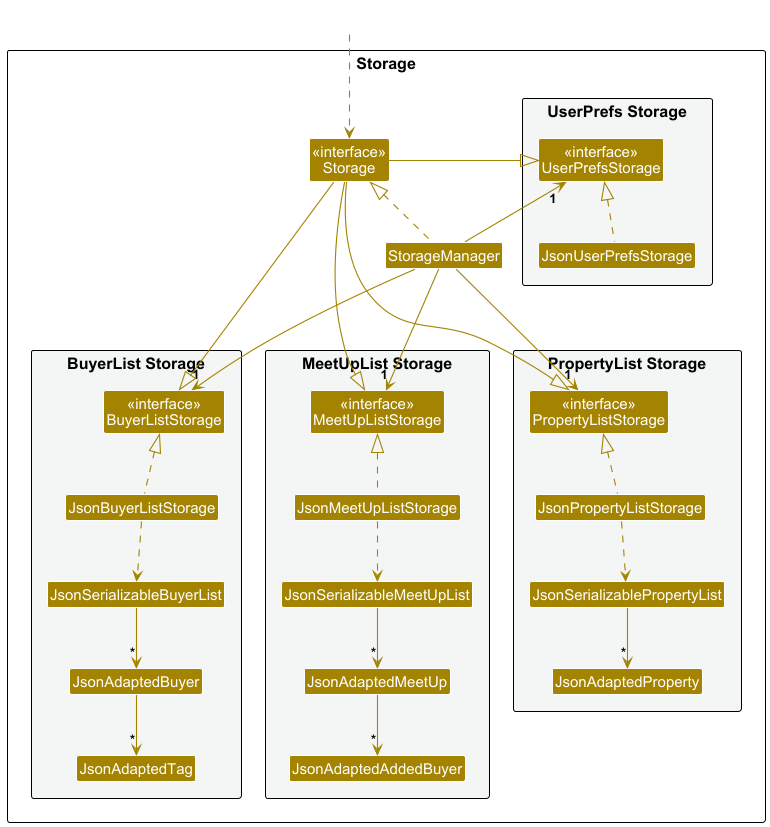
The Storage component,
- can save buyer list data, meetup list data, property list data, and user preference data in JSON format, and read them back into corresponding objects.
- inherits from
BuyerListStorage,MeetUpListStorage,PropertyListStorage, andUserPrefStorage, which means it can be treated as any of them (if only the functionality of only one is needed). - depends on some classes in the
Modelcomponent (because theStoragecomponent’s job is to save/retrieve objects that belong to theModel)
Common classes
Classes used by multiple components are in the seedu.budget.commons package.
Implementation
This section describes some noteworthy details on how certain features are implemented.
Parser Mode Switching
Implementation
User inputs are parsed through AbcliParser to create executable Command objects. The parsing done by AbcliParser is determined by its mode of parsing, which is either the Buyer mode, MeetUp mode, or Property mode. For example, in the Buyer mode, AbcliParser will create a BuyerCommandParser object to parse the input, and create a command that is of type Buyer.
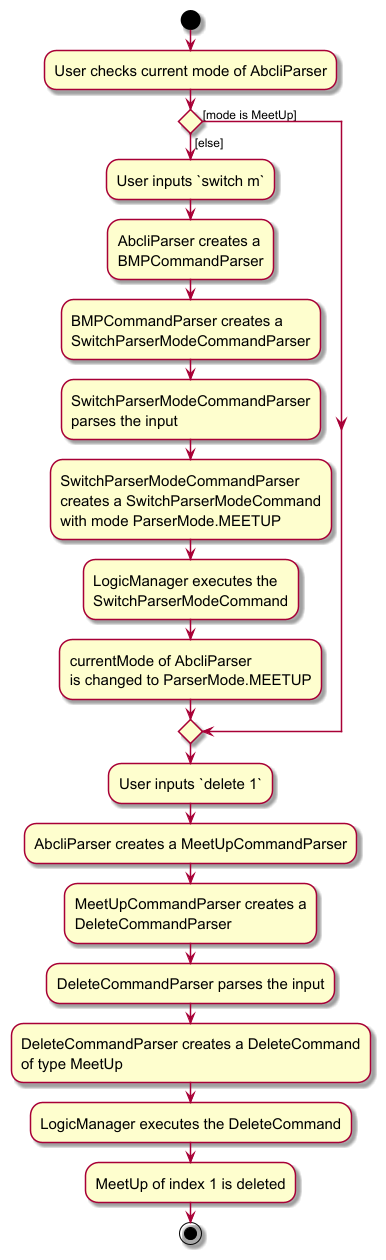
The mode of AbcliParser can be switched by executing a SwitchParserModeCommand. An example of switching to the MeetUp mode:
- User inputs
switch m, which is then passed to theAbcliParserclass. - The
AbcliParserclass then creates either aBuyerCommandParser,MeetUpCommandParser, orPropertyCommandParseraccording to itscurrentMode. (The default current mode is set to Buyer mode, and the type ofCommandParsercreated here does not matter since all of them handleSwitchParserModeCommandthe same way). - The created
CommandParserthen creates aSwitchParserModeCommandParserand uses it to parse the command. - This results in a
SwitchParserModeCommandwith the modeParserMode.MEETUPwhich is executed by theLogicManager. - The
SwitchParserModeCommandthen switches thecurrentModeofAbcliParsertoParserMode.MEETUPwhen executed. ThecurrentModewill affect the type ofCommandParserthat will be created for future parses (in step 2). - The result of the command execution is encapsulated as a
CommandResultobject which is returned back fromLogic.
The diagram below shows the activity diagram for a user wanting to delete the first MeetUp in his MeetUpList:
Documentation, logging, testing, configuration, dev-ops
Appendix: Product Details
Product scope
Target user profile:
A real estate agent who…
- has a need to manage a significant number of client contacts
- frequently needs to track client information such as their budget
- hopes to schedule and manage appointments with the clients
- hopes to ensure smooth communication with clients by sending updates on listings and appointment reminders
- prefers desktop apps over other types
- can type fast
- prefers typing to mouse interactions
- is reasonably comfortable using CLI apps
Value proposition: Using CLI to streamline management of client contacts and communications will make it more efficient than a typical mouse/GUI driven app
User stories
Priorities: High (must have) - * * *, Medium (nice to have) - * *, Low (unlikely to have) - *
| Priority | As a … | I want to … | So that I can… |
|---|---|---|---|
| * * * | new user | see usage instructions | refer to instructions when I forget how to use the App |
| * * * | user | add a new client | keep track of their information |
| * * * | user | delete a client | remove entries that I no longer need |
| * * * | user | find a client by name | locate details of clients without having to go through the entire list |
| * * * | user | categorize clients into buyers and properties (sellers) | easily manage different client types |
| * * * | user | filter clients by name | easily locate clients in the address book |
| * * * | user | filter properties by name or address | easily locate properties in the address book |
| * * * | user | filter meet-ups by subject | easily locate meet-ups in the address book |
| * * * | user | view my contacts using commands | contact them for business |
| * * * | user | collect the name, contact number, and email of clients | I have access to these important information |
| * * * | user | switch between viewing modes | be focused on whichever list I want to view |
| * * * | user | collect the subject, start and end date of my meetups and the client involved | I have access to these important information |
| * * * | user | collect the landlord name, address, phone number of properties | I have access to these important information |
| * * * | user | have a meetup schedule | keep track of future meetups |
| * * * | user | tag clients with labels like high priority or first-time buyer | prioritize my outreach efforts |
| * * | user | a standardise command format | easily pick up how to use the app |
| * * | user | store notes about clients’ property preferences | focus on active prospects |
| * * | user | set reminders for client follow-ups | don’t miss important communication |
| * * | user | group clients by address preferences | tailor property recommendations to their needs |
| * * | user | track status of property deals for each client (e.g. interested, offer made, contract signed) | track which stage the client is at |
| * * | user | add notes to client interactions | easily send property updates |
| * * | user | collect budget preference, neighborhood preference, and property of my buyer and seller | tailor property recommendations to their needs |
| * * | user | edit my contact list | easily change the details of my contacts |
| * * | user | edit my meetup details | easily update the details of my scheduled meetups |
| * | user | hide private contact details | minimize chance of someone else seeing them by accident |
| * | user | filter clients by their buying timelines (e.g. immediate, next 5 months) | maintain regular communication |
| * | user | send bulk emails to groups of clients | inform them of the latest property updates |
| * | long-term user | archive old client contacts | I can keep my active contacts list uncluttered, while still having the ability to retrieve historical client information if needed. |
| * | long-term user | log the last interaction date with the client | capture important details discussed in meetings or phone calls |
| * | expert user | import contacts from my phone or other databases | quicky build my buyer list |
| * | user | set a follow-up frequency for each client | stay in regulr contact |
| * | user | track a client’s viewing history | know which clients have been shown to which property |
| * | user | set up reminders for key seller-related milestones (e.g. contract expiration, price reduction discussions) | never miss an important deadline |
| * | user | track client communication preferences | engage them through their preferred channels |
| * | user | generate a visual timeline of a property’s selling process | easily communicate progress to property owners |
| * | user | receive notifications when it’s time to follow up with a client | not forget |
| * | user | assign a lead source to each client, e.g. referral, open house, website | know where my business is coming from |
| * | real estate agent | schedule and track open house events | ensure smooth operations and follow up with attendees |
| * | user | monitor competing listings in the same area | adjust pricing and marketing strategies accordingly |
| * | user | track commission details for each property sale | keep accurate financial records |
| * | user | generate reports on the number of leads generated per listing | show sellers the interest their property is receiving |
| * | user | manage and log referral partner interactions (e.g. contractors, photographers) | maintain strong professional relationships |
| * | user | track which clients were referred by past clients | send buyers personalized appreciation messages and foster long-term relationships |
Use cases
(For all use cases below, the System is ABCLI and the Actor is the User, unless specified otherwise)
Use Case 1: Switching parser modes
MSS
- User requests to switch the parser mode.
- ABCLI switches to the desired parser mode.
- ABCLI shows the corresponding list of items in the new mode.
Use case ends.
Extensions
- 1a. The inputted parser mode is invalid.
- 1a1. ABCLI informs the User of the error.
Use case ends.
Use Case 2: Adding a buyer
MSS
- User requests to add a buyer.
- ABCLI adds the buyer and displays the updated list of buyers.
Use case ends.
Extensions
- 1a. The inputted command format is invalid.
- 1a1. ABCLI informs the User of the error.
Use case ends.
- 1b. The inputted fields are invalid.
- 1b1. ABCLI informs the User of the error.
Use case ends.
Use Case 3: Deleting a buyer
MSS
- User requests to view buyers.
- ABCLI shows the list of buyers.
- User requests to delete a specific buyer based on the buyer’s index in the list.
- ABCLI deletes the buyer and displays the updated list of the buyers.
Use case ends.
Extensions
- 3a. The index for deletion is not a positive whole number.
- 3a1. ABCLI informs the User of the error.
Use case ends.
- 3b. The index for deletion is out of range.
- 3b1. ABCLI informs the User of the error.
Use case ends.
Use Case 4: Editing a buyer
MSS
- User requests to view buyers.
- ABCLI shows the list of buyers.
- User requests to edit a specific buyer based on the buyer’s index in the list.
- ABCLI edits the buyer and displays the updated list of the buyers.
Use case ends.
Extensions
- 3a. The inputted fields are invalid.
- 3a1. ABCLI informs the User of the error.
Use case ends.
- 3b. The index for editing is out of range.
- 3b1. ABCLI informs the User of the error.
Use case ends.
- 3c. No field to edit is provided.
- 3c1. ABCLI informs the User of the error.
Use case ends.
Use Case 5: Viewing all buyers
MSS
- User requests to view all buyers.
- ABCLI shows the list of buyers.
Use case ends.
Use Case 6: Finding buyers
MSS
- User requests to find buyers by matching keywords to the buyers’ name.
- ABCLI shows the filtered list of buyers whose name matches the keywords.
Use case ends.
Extensions
- 1a. The inputted keywords are invalid.
- 1a1. ABCLI informs the User of the error.
Use case ends.
Use Case 7: Adding a meetup
MSS
- Similar to
Use Case 2: Adding a buyer
Use Case 8: Deleting a meetup
MSS
- Similar to
Use Case 3: Deleting a buyer
Use Case 9: Editing a meetup
MSS
- Similar to
Use Case 4: Editing a buyer
Use Case 10: Viewing all meetups
MSS
- Similar to
Use Case 5: Viewing all buyers
Use Case 11: Finding meetups
MSS
- Similar to
Use Case 6: Finding buyers
Use Case 12: Adding a property
MSS
- Similar to
Use Case 2: Adding a buyer
Use Case 13: Deleting a property
MSS
- Similar to
Use Case 3: Deleting a buyer
Use Case 14: Editing a property
MSS
- Similar to
Use Case 4: Editing a buyer
Use Case 15: Viewing all properties
MSS
- Similar to
Use Case 5: Viewing all buyers
Use Case 16: Finding properties
MSS
- Similar to
Use Case 6: Finding buyers
Non-Functional Requirements
-
ABCLI should be a result of evolving/enhancing/morphing the given codebase.
-
ABCLI should work on any mainstream OS as long as it has Java
17or above installed. -
ABCLI should be able to hold up to 1000 buyers without a noticeable sluggishness in performance for typical usage.
-
A user with above average typing speed for regular English text (i.e. not code, not system admin commands) should be able to accomplish most of the tasks faster using commands than using the mouse.
-
ABCLI should be targeting users who can type fast and prefer typing to other means of input.
-
ABCLI should be for a single user.
-
ABCLI needs to be developed in a breadth-first incremental manner over the project duration.
-
ABCLI’s data should be stored locally and should be in a human editable text file.
-
ABCLI cannot use a DBMS to store data.
-
ABCLI should follow the Object-oriented paradigm primarily.
-
ABCLI should work on the Windows, Linux, and OS-X platforms.
-
ABCLI should work on a computer that has version 17 of Java.
-
ABCLI should work without requiring an installer.
-
ABCLI should not depend on your own remote server.
-
The use of third-party frameworks/libraries/services is allowed but only if they are free, open-source, and have permissive license terms and do not require any installation by users and do not violate other constraints.
-
The GUI should work well for standard screen resolutions 1920x1080 and higher and for screen scales 100% and 125%. In addition, the GUI should be usable for resolutions 1280x720 and higher, and for screen scales 150%.
-
ABCLI has to be packaged into a single JAR file.
Appendix: Instructions for manual testing
Given below are instructions to test the app manually.
Note: These instructions only provide a starting point for testers to work on;
testers are expected to do more exploratory testing.
Launch and shutdown
-
Initial launch
-
Download the jar file and copy into an empty folder
-
Open a command terminal,
cdinto the folder you put the jar file in, and use thejava -jar abcli.jarcommand to run the application.
Expected: Shows the GUI with a set of sample contacts. The window size may not be optimum.
-
-
Saving window preferences
-
Resize the window to an optimum size. Move the window to a different location. Close the window.
-
Re-launch the app by double-clicking the jar file.
Expected: The most recent window size and location is retained.
-
-
Multiple launches
-
Prerequisites: List all buyers using the
viewcommand. At least two buyers in the list. -
Launching the app two times by double-clicking the jar file twice.
Expected: A new instance of the application should open with each double click -
Execute
delete 1on one of the opened application and close the application. -
Execute
delete 2on the other opened application and close the application. -
Launch another instance of the application.
Expected: Second contact from the original buyer list is deleted but not the first. This is because if there are changes made to both instances of the application, only the changes made on the most recent application is saved.
-
-
Force close (unexpected shutdown)
-
Prerequisites: List all buyers using the
viewcommand. At least one buyer in the list. -
Launching the app and execute
delete 1.
Expected: A new instance of the application should open and running this command deletes the first contact from the buyer list. -
Force close the app using Task Manager.
-
Re-launch another instance of the application.
Expected: Changes made are saved.
-
Adding a buyer
-
Adding a new buyer to the buyer list
-
Prerequisites: Switch to buyer mode using the
switch bcommand. Ensure that no buyer with the nameJohn DoeorBetsy Croweis present in the list. -
Test case:
add n/John Doe p/98765432 e/johnd@example.com b/100000
Expected: A new buyer with the nameJohn Doeis added to the list. Details of the added buyer are shown in the status message. -
Test case:
add n/Betsy Crowe t/urgent e/betsycrowe@example.com b/7000000 p/91234567 t/referred
Expected: A new buyer with the nameBetsy Croweand tagsurgentandreferredis added to the list. Details of the added buyer are shown in the status message. -
Test case:
add n/John Doe p/invalidPhone e/johnd@example.com b/100000
Expected: No buyer is added. Error message indicating an invalid phone number is shown as the status message. -
Test case:
add n/John Doe p/98765432 e/johnd@example.com b/
Expected: No buyer is added. Error message indicating an invalid budget (because budget is blank) is shown as the status message.
-
-
Adding an existing buyer to the buyer list
-
Prerequisites: Switch to buyer mode using the
switch bcommand. Ensure that a buyer with the nameJohn Doeis already present in the list. -
Test case:
add n/John Doe p/98765432 e/johndoe@example.com b/100000
Expected: No buyer is added. Error message indicating that the buyer already exists is shown as the status message.
-
Adding a meet-up
-
Adding a new meet-up to the meet-up list
-
Prerequisites: Switch to meet-up mode using the
switch mcommand. Ensure that no meet-up with the subjectDiscuss work plansand from2024-02-03 14:00and to2024-02-03 15:30is present in the list. - Test case:
add s/Discuss work plans i/Meet with Alex and David to discuss the March Project f/2024-02-03 14:00 t/2024-02-03 15:30 n/Alex Yeoh n/David Li
Expected: A new meet-up with the subjectDiscuss work plansis added to the list. Details of the added meet-up are shown in the status message. Note:- If the added buyers (i.e.
Alex Yeoh,David Li) do not exist in the buyer list, they are flagged as red. - If the date-time ranges of the meet-up overlap with that of another meet-up, the from and to date-time of both overlapping meet-ups will be flagged as red.
- If the added buyers (i.e.
- Test case:
add s/Invalid Meeting i/Discuss with team f/2024-02-04 14:00 t/2024-02-04 13:00 n/John Doe
Expected: No meet-up is added. Error message indicating that from must be after to is shown as the status message.
-
-
Adding an existing meet-up to the meet-up list
-
Prerequisites: Switch to meet-up mode using the
switch mcommand. Ensure that a meet-up with the subjectDiscuss work plansand from2024-02-03 14:00and to2024-02-03 15:30is present in the list. -
Test case:
add s/Discuss work plans i/New information f/2024-02-03 14:00 t/2024-02-03 15:30 n/John Doe
Expected: No meet-up is added. Error message indicating that the meet-up already exists is shown as the status message.
-
Adding a property
-
Adding a new property to the property list
-
Prerequisites: Switch to property mode using the
switch pcommand. Ensure that no property with the addressPaya Lebar Rd #01-01is present in the list. -
Test case:
add n/Sean p/87152433 a/Paya Lebar Rd #01-01 s/200000 t/Condominium
Expected: A new property with the addressPaya Lebar Rd #01-01is added to the list. Details of the added property are shown in the status message. -
Test case:
add n/Sean p/invalidPhone a/Bukit Timah Rd s/200000 t/Condominium
Expected: No property is added. Error message indicating an invalid phone number is shown as the status message. -
Test case:
add n/Sean p/87152433 a/Bukit Timah Rd s/ t/Condominium
Expected: No property is added. Error message indicating an invalid asking price (because asking price is blank) is shown as the status message.
-
-
Adding an existing property to the property list
-
Prerequisites: Switch to property mode using the switch p command. Ensure that a property with the address
Paya Lebar Rd #01-01is already present in the list. -
Test case:
add n/Alice p/87152433 a/Paya Lebar Rd #01-01 s/300000 t/Landed
Expected: No property is added. Error message indicating that the property already exists is shown as the status message.
-
Deleting a buyer
-
Deleting a buyer while all buyers are being shown
-
Prerequisites: Switch to buyer mode using the
switch bcommand. List all buyers using theviewcommand. Multiple buyers in the list. -
Test case:
delete 1
Expected: First buyer is deleted from the list. Details of the deleted buyer shown in the status message. -
Test case:
delete 0,delete -1,delete y(where y is not a positive number)
Expected: No buyer is deleted. Error message indicating invalid command format is shown as the status message. -
Test case:
delete x(where x is larger than the list size)
Expected: No buyer is deleted. Error message indicating invalid buyer index is shown as the status message. -
Other incorrect delete commands to try:
delete,delete abc,...
Expected: No buyer is deleted. Error message indicating invalid command format is shown as the status message.
-
-
Deleting a buyer while some buyers are filtered in the list
-
Prerequisites: Switch to buyer mode using the
switch bcommand. Filter the buyer list using thefindcommand to show only some buyers (fewer than full list) using relevant filters. -
Test case:
delete 1
Expected: First (and only) buyer in the filtered list is deleted. Details of the deleted buyer are shown in the status message. -
Test case:
delete x(where x is within the bounds of the full list but not within the filtered list)
Expected: No buyer is deleted. Error message indicating an invalid buyer index is shown as the status message.
-
Deleting a meet-up
- Similar steps to those outlined in deleting a buyer can be followed, but in the context of meet-up mode. Before performing the tests, ensure the application is in meet-up mode by using the
switch mcommand.
Deleting a property
- Similar steps to those outlined in deleting a buyer can be followed, but in the context of property mode. Before performing the tests, ensure the application is in property mode by using the
switch pcommand.
Editing a buyer
-
Editing a buyer while all buyers are being shown
-
Prerequisites: Switch to buyer mode using the
switch bcommand. List all buyers using theviewcommand. Multiple buyers are present in the list. -
Test case:
edit 1 b/700000 p/91234567
Expected: First buyer’s budget and phone number are updated. All other fields remain the same. Details of the edited buyer are shown in the status message. -
Test case:
edit 0 b/700000,edit -1 b/700000,edit y b/700000(where y is not a positive number)
Expected: No changes are made. Error message indicating invalid command format is shown as the status message. -
Test case:
edit 1
Expected: No changes are made as no fields are specified. Error message prompts for at least one field to edit. -
Test case:
edit x b/700000(where x is larger than the list size)
Expected: No changes are made. Error message indicating invalid buyer index is shown as the status message. -
Test case:
edit 1 b/700000 p/91@83817
Expected: No changes are made. Error message indicating invalid phone number is shown as the status message.
-
-
Editing a buyer in a filtered list
-
Prerequisites: Switch to buyer mode using the
switch bcommand. Filter the buyer list using thefindcommand to show only some buyers (fewer than full list) using relevant filters. -
Test case:
edit 1 p/87151234
Expected: First (and only) buyer in the filtered list has its phone number updated. Details of the edited buyer shown in the status message. -
Test case:
edit x p/87151234(where x is within the bounds of the full list but not within the filtered list)
Expected: No changes made. Error message indicating an invalid buyer index is shown as the status message.
-
-
Attempting to edit to create a duplicate buyer
-
Prerequisites: Switch to buyer mode using the
switch bcommand. List all buyers using theviewcommand. At least two buyers present. -
Test case:
edit 1 n/x(where x is another existing name)
Expected: No changes are made. Error message indicating that buyer already exists in application is shown as the status message.
-
Editing a meet-up
-
Editing a meet-up while all meet-ups are being shown
-
Prerequisites: Switch to meet-up mode using the
switch mcommand. List all meet-ups using theviewcommand. Multiple meet-ups are present in the list. -
Test case:
edit 1 i/New information n/Adam
Expected: First meet-up information and added buyers are updated. All other fields remain the same. Details of the edited meet-up are shown in the status message. Note that if added buyer (i.e.Adam) is not found in the buyer list, it will be flagged out as red. -
Test case:
edit 0 i/New information,edit -1 i/New information,edit y i/New information(where y is not a positive number)
Expected: No changes are made. Error message indicating invalid command format is shown as the status message. -
Test case:
edit 1
Expected: No changes are made as no fields are specified. Error message prompts for at least one field to edit. -
Test case:
edit x i/New information(where x is larger than the list size)
Expected: No changes are made. Error message indicating invalid meet-up index is shown as the status message. -
Test case:
edit 1 t/23 June 2024
Expected: No changes are made. Error message indicating an invalid to date-time format is shown as the status message.
-
-
Editing a meet-up in a filtered list
-
Prerequisites: Switch to meet-up mode using the
switch mcommand. Filter the meet-up list using thefindcommand to show only some meet-ups (fewer than full list) using relevant filters. -
Test case:
edit 1 i/New information
Expected: First (and only) meet-up in the filtered list has its information updated. Details of the edited meet-up is shown in the status message. -
Test case:
edit x i/New information(where x is within the bounds of the full list but not within the filtered list)
Expected: No changes made. Error message indicating an invalid meet-up index is shown as the status message.
-
-
Attempting to edit to create a duplicate meet-up
-
Prerequisites: Switch to meet-up mode using the
switch mcommand. List all meet-ups using theviewcommand. At least two meet-ups present. -
Test case:
edit 1 s/xt t/xt f/xf(where xs, xt, xf are the subject, to and from of another existing meet-up in the list)
Expected: No changes are made. Error message indicating that meet-up already exists in application is shown as the status message.
-
Editing a property
-
Editing a property while all properties are being shown
-
Prerequisites: Switch to property mode using the
switch pcommand. List all properties using theviewcommand. Multiple properties are present in the list. -
Test case:
edit 1 s/700000 p/91234567
Expected: First property’s asking price and landlord phone number are updated. All other fields remain the same. Details of the edited property are shown in the status message. -
Test case:
edit 0 s/700000,edit -1 s/700000,edit y s/700000(where y is not a positive number)
Expected: No changes are made. Error message indicating invalid command format is shown as the status message. -
Test case:
edit 1
Expected: No changes are made as no fields are specified. Error message prompts for at least one field to edit. -
Test case:
edit x s/700000(where x is larger than the list size)
Expected: No changes are made. Error message indicating invalid property index is shown as the status message. -
Test case:
edit 1 s/700000 p/91@83817
Expected: No changes are made. Error message indicating invalid phone number is shown as the status message.
-
-
Editing a property in a filtered list
-
Prerequisites: Switch to property mode using the
switch pcommand. Filter the property list using thefindcommand to show only some properties (fewer than full list) using relevant filters. -
Test case:
edit 1 p/87151234
Expected: First (and only) property in the filtered list has its landlord phone number updated. Details of the edited property shown in the status message. -
Test case:
edit x p/87151234(where x is within the bounds of the full list but not within the filtered list)
Expected: No changes made. Error message indicating an invalid property index is shown as the status message.
-
-
Attempting to edit to create a duplicate property
-
Prerequisites: Switch to property mode using the
switch pcommand. List all properties using theviewcommand. At least two properties present. -
Test case:
edit 1 a/x(where x is another existing address)
Expected: No changes are made. Error message indicating that property already exists in application is shown as the status message.
-
Finding a buyer
-
Finding buyers by name keywords
-
Prerequisites: Switch to buyer mode using the
switch bcommand. -
Test case:
find n/Alex David
Expected: Buyers with names containing the keywordsAlexorDavidare shown in the list. The number of buyers found is displayed in the status message. -
Test case:
find n/(empty keyword)
Expected: Error message indicating an invalid name (because name is blank) will be shown as status message.
-
Finding a meet-up
-
Finding meet-up by subject keywords
-
Prerequisites: Switch to meet-up mode using the
switch mcommand. -
Test case:
find s/Sales Investors
Expected: Meet-ups with names containing the keywordsSalesorInvestorsare shown in the list. The number of meet-ups found is displayed in the status message. -
Test case:
find s/(empty keyword)
Expected: Error message indicating an invalid subject (because subject is blank) will be shown as status message.
-
Finding a property
-
Finding properties by address keywords
-
Prerequisites: Switch to property mode using the
switch pcommand. -
Test case:
find a/Bishan Marsiling Shibuya
Expected: Properties with addresses containing the keywordsBishan,Marsiling, orShibuyaare shown in the list. The number of properties found is displayed in the status message. -
Test case:
find a/(empty keyword)
Expected: Error message indicating an invalid address (because address is blank) will be shown as status message.
-
-
Finding properties by landlord name keywords
-
Prerequisites: Switch to property mode using the
switch pcommand. -
Test case:
find n/Kurz Elle Bob
Expected: Properties with landlord names containingKurz,Elle, orBobare shown in the list. The number of properties found is displayed in the status message. -
Test case:
find n/
Expected: Error message indicating an invalid name (because landlord name is blank) will be shown as status message.
-
-
Attempting to input an incorrect find command format
-
Prerequisites: Switch to property mode using the
switch pcommand. -
Test case:
find a/bishan n/john,find
Expected: Error message indicating invalid command format is shown as status message.
-
Saving data
- Dealing with missing / corrupted data files
-
Under the
datasection, delete 1 or more of the data files before starting the application. Expected: The program will automatically populate thedatafolder with a sample file. -
Under the
datasection, add a new parameter into one of the entries in any file.
Expected: The program will ignore the new parameter and read the data file as usual. -
Under the
datasection, edit any of the required parameters in any of the files to turn the parameter invalid. Expected: The program will ignore any saved data from that file and open an empty file.
-
Appendix: Planned Enhancements
Our team size is 5.
Support for special characters in names
- We plan to add support for special characters in names such as Lupita Nyong’o, Adib S/O Tharman etc. This can be done by updating the validation regex to accept certain special characters.
Restriction of property types
- Property types will be given restrictions in the future such that nonsensical types will not be accepted. We will create an
enumwith common types such asHDB,Landed Property,Condominiumetc.
Improved duplication detection
- Buyer duplication detection will be changed from the current method of checking for repeated names to checking for a repeated phone number OR email as these are better unique identifiers.
Setting a maximum for budget and asking price
- Currently, there are no restrictions on the maximum value an asking price or budget can take. Therefore, the user can input unrealistic values such as 999,999,999,999. This also creates an issue of
longoverflow when the value is too large (exceeds9223372036854775807) as the application uses thejava.lang.Long.parseLong()method. - A planned enhancement will be to use validation regex to ensure that the asking price and budget values are below a maximum, which can be set to 1,000,000,000.
Find using more parameters
-
findwill be updated for all 3 modes to allow the use of more parameters (such as:b/BUDGET,p/PHONE,e/EMAIL, andt/TAGfor buyers). We will change thefindcommand to accept more types of parameters.
Appendix: Glossary
Glossary
-
ABCLI
Our product name. -
CLI
The command line interface is a way to interact with a computer by typing text commands instead of using a mouse to click on icons. -
Flag
In our context, a flag is something preceded by a/, but is not the initial command. e.g. inadd n/NAME,n/is a flag butaddis not. -
GUI
Graphical user interface. The screen you see when opening the application. -
JAR file
A JAR (Java ARchive) file is a compressed package that bundles multiple Java classes and resources for easier distribution and deployment. It can also be executable if it contains a Main-Class entry, allowing it to be run directly on any system with a Java Runtime Environment (JRE). -
JavaFX
JavaFX is a Java library used to build rich, interactive graphical user interfaces (GUIs) for desktop applications. It provides tools for designing and styling UI components and supports modern features like 2D/3D graphics, animation, and media playback. -
Non-Functional Requirement
A non-functional requirement specifies criteria that judge the operation of a system, such as performance, reliability, and usability. Unlike functional requirements, it focuses on how a system performs rather than what it does. -
Parameter
A value that you need to provide for the command to work. e.g. inadd n/NAME,NAMEis a parameter. -
Plant UML
PlantUML is a tool that allows users to create diagrams, such as UML diagrams, by writing simple, text-based descriptions that are then converted into visual representations. It supports a range of diagrams—like class, sequence, and activity diagrams—and is often used to quickly illustrate system designs or workflows. -
Use Case
A use case describes a specific way that a user interacts with a system to achieve a goal, often outlining steps from start to finish. It helps clarify system requirements by detailing the actions, conditions, and outcomes for each interaction scenario.